이 글은 AWS 인프라 운영 중 경험한 실제 비용절감 사례를 기록한 시리즈입니다.
1. 개요
인프라 비용절감 팀을 FinOps?라고 많이 하는 거 같다. 비용절감 프로젝트를 하면서 운영 중 경험한 실제 비용절감 사례가 나와 같은 엔지니어들에게 도움이 되고자 글을 작성한다. 현재 인프라 구조는 EKS를 메인으로 사용하고 있다. 따라서 EKS의 node(EC2) 비용이 생각보다 많이 나가고 있었고 CA를 사용하고 있어 비용절감을 위해 kapenter를 도입하기로 마음먹었다.
그래서 karpenter가 뭐 하는 친구인데?
Karpenter는 쿠버네티스용으로 구축된 오픈소스 노드 수명 주기 관리 프로젝트입니다. 쿠버네티스 클러스터에 Karpenter를 추가하면 해당 클러스터에서 워크로드를 실행하는 효율성과 비용을 크게 향상할 수 있습니다. Karpenter는 다음과 같은 방식으로 작동합니다.
- Kubernetes 스케줄러가 예약 불가능으로 표시한 포드를 감시합니다.
- 포드에서 요청한 스케줄링 제약 조건(리소스 요청, 노드 선택기, 친화성, 허용 및 토폴로지 확산 제약 조건) 평가
- 포드의 요구 사항을 충족하는 노드 프로비저닝
- 더 이상 필요하지 않은 노드를 중단합니다.
위는 공식 문서에서 발췌한 내용이다.
Cluster Autoscaler VS karpenter
| 출시 시기 | CA | Karpenter |
| 노드 그룹 관리 방식 | 기존 ASG 기반 (명시적 노드 그룹 필요) | ASG 불필요, 개별 인스턴스 단위로 동적 생성 |
| 스케일링 속도 | 느림 (ASG 의존) | 빠름 (즉시 인스턴스 생성) |
| 인스턴스 타입 다양성 | 고정된 노드그룹 내에서만 가능 | Spot/On-Demand, 다양한 인스턴스 타입 실시간 선택 |
| Spot 인스턴스 활용 | 제한적 | Spot 최적화 |
| 커뮤니티 및 안정성 | 매우 안정적, 널리 사용 | AWS 공식 지원, CNCF 오픈소스 |
| Pod 기반 노드 프로비저닝 | ❌ (노드 단위 스케일링) | ✅ (Pod 스펙에 따라 즉시 최적 노드 생성) |
| 실시간 인스턴스 가격 반영 | ❌ | ✅ (EC2 가격 기반 인스턴스 선택 가능) |
| AWS 전용 여부 | ❌ (모든 클라우드 지원) | ✅ (AWS 전용) |
2. kapenter flow
- 여러 인스턴스 유형을 선택하여 pod의 리소스 크기에 맞게 핏한 노드생성이 가능하기 때문에 비용최적화가 가능
- CA보다 빠른 노드 프로비저닝
- 추 후 SPOT 도입 가능성 ( NTH와 함께 사용 )
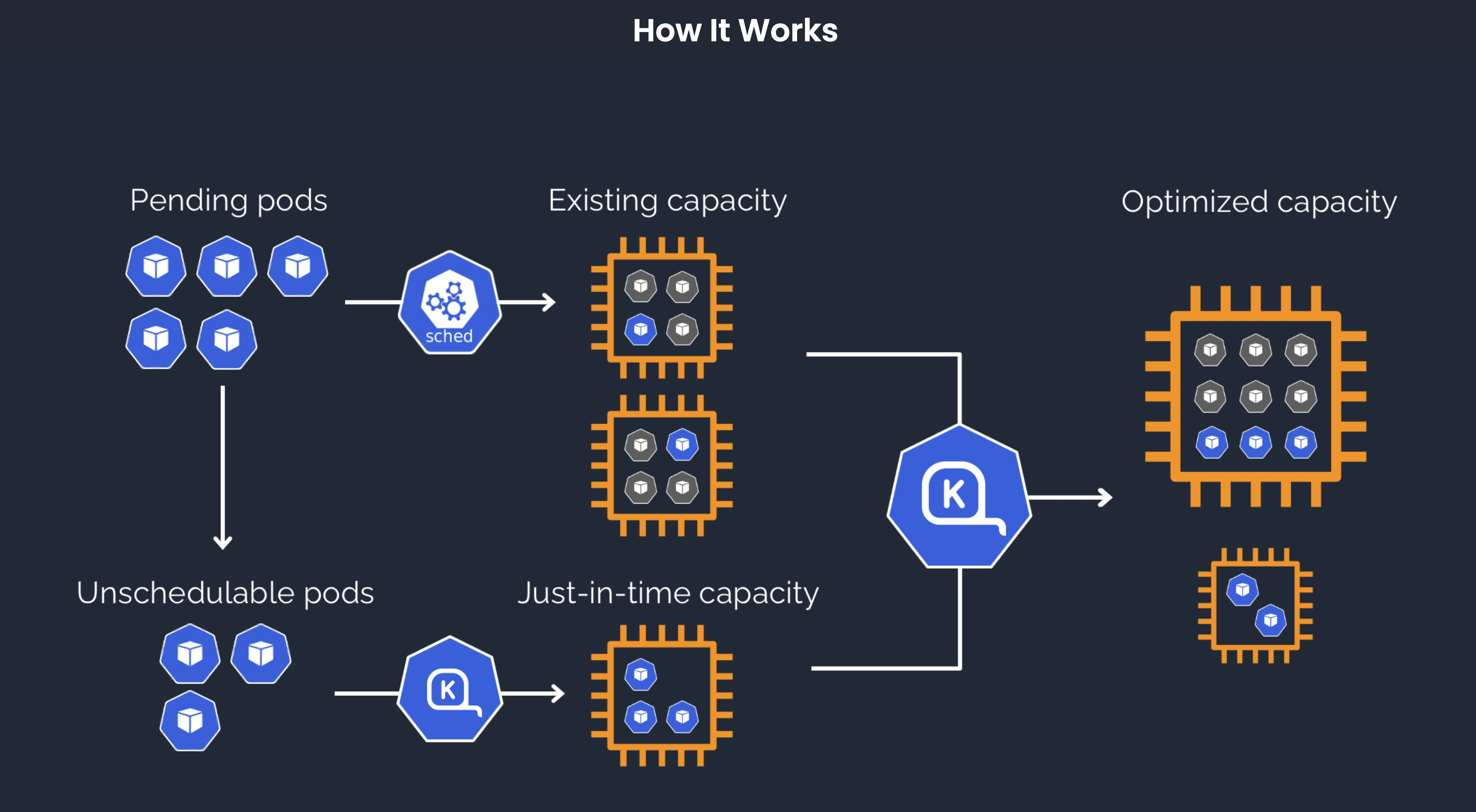
- 카팬터를 사용하려면 nodeclaim, nodepool, nodeclass등 여러 기능을 사전에 알아야 한다.
- NodeClaims
-> Karpenter 워크플로에서 용량 프로비저닝과 노드 중단 시 중요한 역할
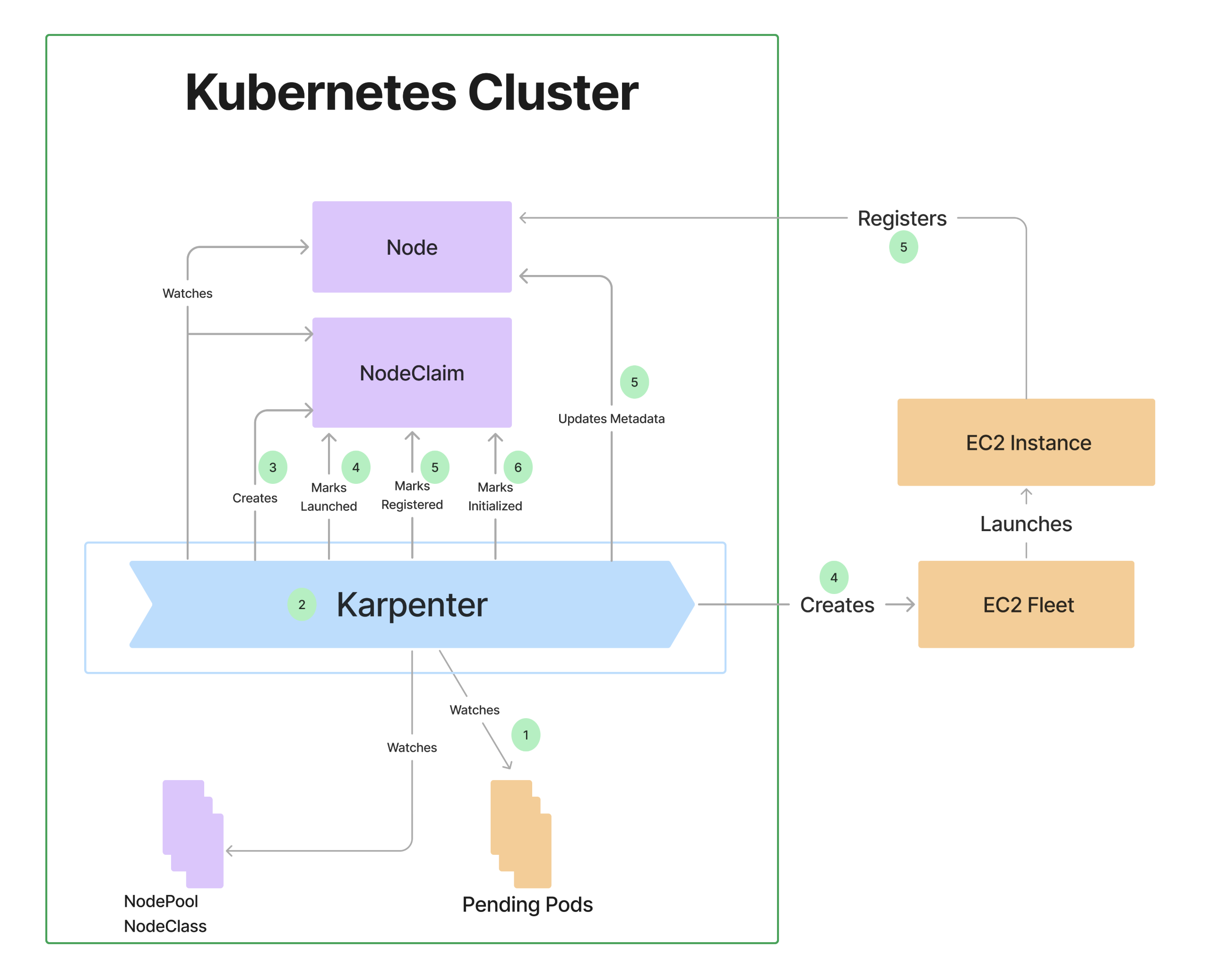
- NodeClass
-> AWS 인프라를 어떻게 구성할지 정의 (서브넷, 보안그룹, AMI 등) - NodePool
-> 어떤 워크로드가 어떤 노드에서 실행돼야 할지를 정책으로 정의
3. 작업 과정 ( Karpenter version 1.3 )
- IAM 역할 2개 생성
- SecurityGroup, Subnet에 Tag 설정
- karpenter에서 사용할 IAM 정책 생성 총 karpenter와 karpenter controller가 사용할 역할 2개를 생성해야 함
- nodeclass 생성
- nodepool 생성
IAM 생성 작업 - karpenter node
echo '{
    "Version": "2012-10-17",
    "Statement": [
        {
            "Effect": "Allow",
            "Principal": {
                "Service": "ec2.amazonaws.com"
            },
            "Action": "sts:AssumeRole"
        }
    ]
}' > node-trust-policy.json

aws iam create-role --role-name "KarpenterNodeRole-${CLUSTER_NAME}" \
    --assume-role-policy-document file://node-trust-policy.json
aws iam attach-role-policy --role-name "KarpenterNodeRole-${CLUSTER_NAME}" \
--policy-arn "arn:${AWS_PARTITION}:iam::aws:policy/AmazonEKSWorkerNodePolicy"
aws iam attach-role-policy --role-name "KarpenterNodeRole-${CLUSTER_NAME}" \
--policy-arn "arn:${AWS_PARTITION}:iam::aws:policy/AmazonEKS_CNI_Policy"
aws iam attach-role-policy --role-name "KarpenterNodeRole-${CLUSTER_NAME}" \
--policy-arn "arn:${AWS_PARTITION}:iam::aws:policy/AmazonEC2ContainerRegistryPullOnly"
aws iam attach-role-policy --role-name "KarpenterNodeRole-${CLUSTER_NAME}" \
--policy-arn "arn:${AWS_PARTITION}:iam::aws:policy/AmazonSSMManagedInstanceCore"IAM 생성 작업 - karpenter controller pod (IRSA)
cat << EOF > controller-trust-policy.json
{
    "Version": "2012-10-17",
    "Statement": [
        {
            "Effect": "Allow",
            "Principal": {
                "Federated": "arn:${AWS_PARTITION}:iam::${AWS_ACCOUNT_ID}:oidc-provider/${OIDC_ENDPOINT#*//}"
            },
            "Action": "sts:AssumeRoleWithWebIdentity",
            "Condition": {
                "StringEquals": {
                    "${OIDC_ENDPOINT#*//}:aud": "sts.amazonaws.com",
                    "${OIDC_ENDPOINT#*//}:sub": "system:serviceaccount:${KARPENTER_NAMESPACE}:karpenter"
                }
            }
        }
    ]
}
EOF

aws iam create-role --role-name "KarpenterControllerRole-${CLUSTER_NAME}" \
    --assume-role-policy-document file://controller-trust-policy.json

cat << EOF > controller-policy.json
{
    "Statement": [
        {
            "Action": [
                "ssm:GetParameter",
                "ec2:DescribeImages",
                "ec2:RunInstances",
                "ec2:DescribeSubnets",
                "ec2:DescribeSecurityGroups",
                "ec2:DescribeLaunchTemplates",
                "ec2:DescribeInstances",
                "ec2:DescribeInstanceTypes",
                "ec2:DescribeInstanceTypeOfferings",
                "ec2:DeleteLaunchTemplate",
                "ec2:CreateTags",
                "ec2:CreateLaunchTemplate",
                "ec2:CreateFleet",
                "ec2:DescribeSpotPriceHistory",
                "pricing:GetProducts"
            ],
            "Effect": "Allow",
            "Resource": "*",
            "Sid": "Karpenter"
        },
        {
            "Action": "ec2:TerminateInstances",
            "Condition": {
                "StringLike": {
                    "ec2:ResourceTag/karpenter.sh/nodepool": "*"
                }
            },
            "Effect": "Allow",
            "Resource": "*",
            "Sid": "ConditionalEC2Termination"
        },
        {
            "Effect": "Allow",
            "Action": "iam:PassRole",
            "Resource": "arn:${AWS_PARTITION}:iam::${AWS_ACCOUNT_ID}:role/KarpenterNodeRole-${CLUSTER_NAME}",
            "Sid": "PassNodeIAMRole"
        },
        {
            "Effect": "Allow",
            "Action": "eks:DescribeCluster",
            "Resource": "arn:${AWS_PARTITION}:eks:${AWS_REGION}:${AWS_ACCOUNT_ID}:cluster/${CLUSTER_NAME}",
            "Sid": "EKSClusterEndpointLookup"
        },
        {
            "Sid": "AllowScopedInstanceProfileCreationActions",
            "Effect": "Allow",
            "Resource": "*",
            "Action": [
            "iam:CreateInstanceProfile"
            ],
            "Condition": {
            "StringEquals": {
                "aws:RequestTag/kubernetes.io/cluster/${CLUSTER_NAME}": "owned",
                "aws:RequestTag/topology.kubernetes.io/region": "${AWS_REGION}"
            },
            "StringLike": {
                "aws:RequestTag/karpenter.k8s.aws/ec2nodeclass": "*"
            }
            }
        },
        {
            "Sid": "AllowScopedInstanceProfileTagActions",
            "Effect": "Allow",
            "Resource": "*",
            "Action": [
            "iam:TagInstanceProfile"
            ],
            "Condition": {
            "StringEquals": {
                "aws:ResourceTag/kubernetes.io/cluster/${CLUSTER_NAME}": "owned",
                "aws:ResourceTag/topology.kubernetes.io/region": "${AWS_REGION}",
                "aws:RequestTag/kubernetes.io/cluster/${CLUSTER_NAME}": "owned",
                "aws:RequestTag/topology.kubernetes.io/region": "${AWS_REGION}"
            },
            "StringLike": {
                "aws:ResourceTag/karpenter.k8s.aws/ec2nodeclass": "*",
                "aws:RequestTag/karpenter.k8s.aws/ec2nodeclass": "*"
            }
            }
        },
        {
            "Sid": "AllowScopedInstanceProfileActions",
            "Effect": "Allow",
            "Resource": "*",
            "Action": [
            "iam:AddRoleToInstanceProfile",
            "iam:RemoveRoleFromInstanceProfile",
            "iam:DeleteInstanceProfile"
            ],
            "Condition": {
            "StringEquals": {
                "aws:ResourceTag/kubernetes.io/cluster/${CLUSTER_NAME}": "owned",
                "aws:ResourceTag/topology.kubernetes.io/region": "${AWS_REGION}"
            },
            "StringLike": {
                "aws:ResourceTag/karpenter.k8s.aws/ec2nodeclass": "*"
            }
            }
        },
        {
            "Sid": "AllowInstanceProfileReadActions",
            "Effect": "Allow",
            "Resource": "*",
            "Action": "iam:GetInstanceProfile"
        }
    ],
    "Version": "2012-10-17"
}
EOF

aws iam put-role-policy --role-name "KarpenterControllerRole-${CLUSTER_NAME}" \
    --policy-name "KarpenterControllerPolicy-${CLUSTER_NAME}" \
    --policy-document file://controller-policy.json
Security Group Tag 추가
NODEGROUP=$(aws eks list-nodegroups --cluster-name "${CLUSTER_NAME}" \
    --query 'nodegroups[0]' --output text)

LAUNCH_TEMPLATE=$(aws eks describe-nodegroup --cluster-name "${CLUSTER_NAME}" \
    --nodegroup-name "${NODEGROUP}" --query 'nodegroup.launchTemplate.{id:id,version:version}' \
    --output text | tr -s "\t" ",")

# If your EKS setup is configured to use only Cluster security group, then please execute -

SECURITY_GROUPS=$(aws eks describe-cluster \
    --name "${CLUSTER_NAME}" --query "cluster.resourcesVpcConfig.clusterSecurityGroupId" --output text)

# If your setup uses the security groups in the Launch template of a managed node group, then :

SECURITY_GROUPS="$(aws ec2 describe-launch-template-versions \
    --launch-template-id "${LAUNCH_TEMPLATE%,*}" --versions "${LAUNCH_TEMPLATE#*,}" \
    --query 'LaunchTemplateVersions[0].LaunchTemplateData.[NetworkInterfaces[0].Groups||SecurityGroupIds]' \
    --output text)"

aws ec2 create-tags \
    --tags "Key=karpenter.sh/discovery,Value=${CLUSTER_NAME}" \
    --resources "${SECURITY_GROUPS}"
위의 작업을 통해 사전작업이 완료되었으면 helm을 통해 배포하면 된다.
- helm chart 생성
helm의 values.yaml 파일을 복사하여 values-prod.yaml 파일 생성
${} 변수처리 되어 있는 부분은 각자 알맞은 값을 넣어서 사용하면 된다.
serviceAccount와 같은 경우 위에서 생성한 controller의 iam을 기입해줘야 한다.
serviceAccount:
  # -- Additional annotations for the ServiceAccount.
  annotations:
    eks.amazonaws.com/role-arn: "arn:aws:iam::$accountid:role/AmazonEKS-KarpenterController-PROD"
# -- Specifies additional rules for the core ClusterRole.

nodeSelector:
  system: "true"
# -- Affinity rules for scheduling the pod. If an explicit label selector is not provided for pod affinity or pod anti-affinity one will be created from the pod selector labels.
affinity:
  nodeAffinity:
    requiredDuringSchedulingIgnoredDuringExecution:
      nodeSelectorTerms:
        - matchExpressions:
            - key: karpenter.sh/nodepool
              operator: DoesNotExist
  podAntiAffinity:
    requiredDuringSchedulingIgnoredDuringExecution:
      - topologyKey: "kubernetes.io/hostname"
# -- Topology spread constraints to increase the controller resilience by distributing pods across the cluster zones. If an explicit label selector is not provided one will be created from the pod selector labels.
topologySpreadConstraints:
  - maxSkew: 1
    topologyKey: topology.kubernetes.io/zone
    whenUnsatisfiable: DoNotSchedule
# -- Tolerations to allow the pod to be scheduled to nodes with taints.
tolerations:
  - key: CriticalAddonsOnly
    operator: Exists

controller:
  # -- Distinguishing container name (containerName: karpenter-controller).

  resources: {}
  # We usually recommend not to specify default resources and to leave this as a conscious
  # choice for the user. This also increases chances charts run on environments with little
  # resources, such as Minikube. If you do want to specify resources, uncomment the following
  # lines, adjust them as necessary, and remove the curly braces after 'resources:'.
  #  requests:
  #    cpu: 1
  #    memory: 1Gi
  #  limits:
  #    cpu: 1
  #    memory: 1Gi

  # -- Additional volumeMounts for the controller pod.
  extraVolumeMounts: []
  # - name: aws-iam-token
  #   mountPath: /var/run/secrets/eks.amazonaws.com/serviceaccount
  #   readOnly: true
  # -- Additional sidecarContainer config
  sidecarContainer: []
  # -- Additional volumeMounts for the sidecar - this will be added to the volume mounts on top of extraVolumeMounts
  sidecarVolumeMounts: []
  metrics:
    # -- The container port to use for metrics.
    port: 8080
  healthProbe:
    # -- The container port to use for http health probe.
    port: 8081
# -- Global log level, defaults to 'info'
logLevel: info
# -- Log outputPaths - defaults to stdout only
logOutputPaths:
  - stdout
# -- Log errorOutputPaths - defaults to stderr only
logErrorOutputPaths:
  - stderr
# -- Global Settings to configure Karpenter
settings:
  # -- The maximum length of a batch window. The longer this is, the more pods we can consider for provisioning at one
  # time which usually results in fewer but larger nodes.
  batchMaxDuration: 10s
  # -- The maximum amount of time with no new ending pods that if exceeded ends the current batching window. If pods arrive
  # faster than this time, the batching window will be extended up to the maxDuration. If they arrive slower, the pods
  # will be batched separately.
  batchIdleDuration: 1s
  # -- Cluster CA bundle for TLS configuration of provisioned nodes. If not set, this is taken from the controller's TLS configuration for the API server.
  clusterCABundle: ""
  # -- Cluster name.
  clusterName: "${eksclustername}"
  # -- Cluster endpoint. If not set, will be discovered during startup (EKS only)
  clusterEndpoint: ""
  # -- If true then assume we can't reach AWS services which don't have a VPC endpoint
  # This also has the effect of disabling look-ups to the AWS pricing endpoint
  isolatedVPC: false
  # Marking this true means that your cluster is running with an EKS control plane and Karpenter should attempt to discover cluster details from the DescribeCluster API
  eksControlPlane: false
  # -- The VM memory overhead as a percent that will be subtracted from the total memory for all instance types. The value of `0.075` equals to 7.5%.
  vmMemoryOverheadPercent: 0.075
  # -- Interruption queue is the name of the SQS queue used for processing interruption events from EC2
  # Interruption handling is disabled if not specified. Enabling interruption handling may
  # require additional permissions on the controller service account. Additional permissions are outlined in the docs.
  interruptionQueue: ""
  # -- Reserved ENIs are not included in the calculations for max-pods or kube-reserved
  # This is most often used in the VPC CNI custom networking setup https://docs.aws.amazon.com/eks/latest/userguide/cni-custom-network.html
  reservedENIs: "0"
  # -- Feature Gate configuration values. Feature Gates will follow the same graduation process and requirements as feature gates
  # in Kubernetes. More information here https://kubernetes.io/docs/reference/command-line-tools-reference/feature-gates/#feature-gates-for-alpha-or-beta-features
  featureGates:
    # -- spotToSpotConsolidation is ALPHA and is disabled by default.
    # Setting this to true will enable spot replacement consolidation for both single and multi-node consolidation.
    spotToSpotConsolidation: false
    # -- nodeRepair is ALPHA and is disabled by default.
    # Setting this to true will enable node repair.
    nodeRepair: false
여기서 핵심은 karpenter로 생성된 node에 karpenter pod가 생성되면 안 된다. 따라서 위의 설정중 핵심 설정만 설명하고자 한다.
nodeAffinity
requiredDuringSchedulingIgnoredDuringExecution:
  nodeSelectorTerms:
    - matchExpressions:
        - key: karpenter.sh/nodepool
operator: DoesNotExist- 의미: karpenter.sh/nodepool 라벨이 없는 노드에만 배치하겠다는 조건
- DoesNotExist는 해당 키가 존재하지 않아야 한다는 조건이므로, 예를 들어 Karpenter로 관리되는 노드에는 이 라벨이 자동 생성되므로 → Karpenter가 만든 노드를 피하겠다는 의도입니다.
helm upgrade --install karpenter . -n karpenter -f values-prod.yamlnodeClass 생성
AWS의 공식 문서
AMIs가 릴리스될 때 배포되는 다른 방법을 사용하면 프로덕션 클러스터에서 워크로드 장애 및 가동 중지가 발생할 위험이 있습니다.
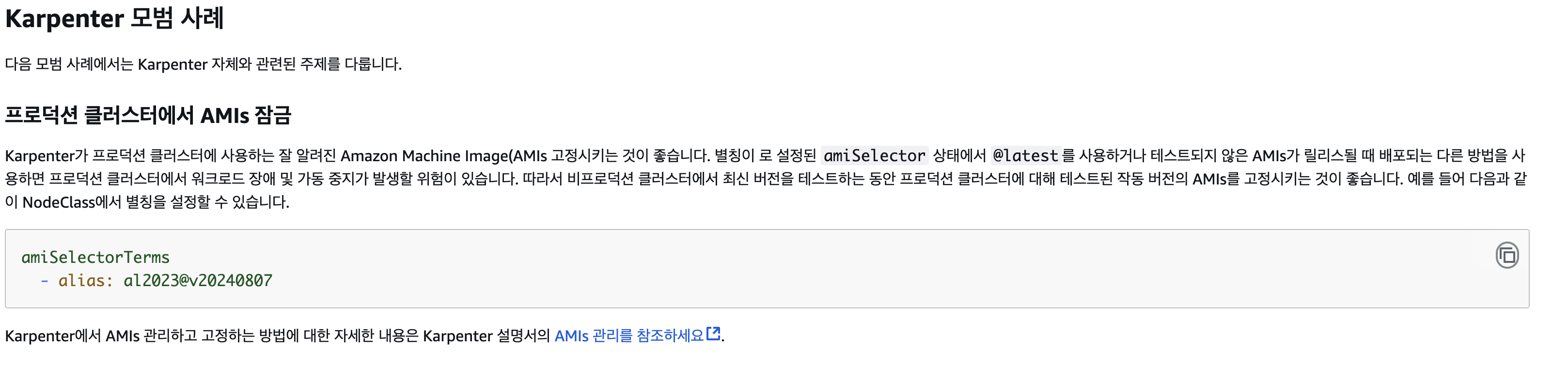
- 커스텀 이미지를 사용하고 있으면 해당 이미지를 넣어주고 아니면 AWS에서 제공하는 이미지를 넣어야함.
aws ssm get-parameter --name /aws/service/eks/optimized-ami/<kubernetes-version>/<ami-type>/recommended/image_id \
--region ap-northeast-2 --query "Parameter.Value" --output text- <kubernetes-version>을 지원되는 Amazon EKS 버전으로 변경합니다.
- ami-type를 다음 옵션 중 하나로 변경합니다. Amazon EC2 인스턴스 유형에 대한 자세한 내용은 Amazon EC2 인스턴스 유형을 참조하세요.
- Amazon Linux 2023(AL2023) x86 기반 인스턴스에는 amazon-linux-2023/x86_64/standard를 사용합니다.
- AWS Graviton 기반 인스턴스와 같은 AL2023 ARM 인스턴스에는 amazon-linux-2023/arm64/standard를 사용합니다
- 승인된 최신 AL2023 NVIDIA x86 기반 인스턴스에 amazon-linux-2023/x86_64/nvidia를 사용합니다.
- 승인된 최신 AL2023 NVIDIA arm64 기반 인스턴스에 amazon-linux-2023/arm64/nvidia를 사용합니다.
- 최신 AL2023 AWS Neuron 인스턴스에는 amazon-linux-2023/x86_64/neuron을 사용하세요.
- amazon-linux-2를 Amazon Linux 2(AL2) x86 기반 인스턴스에 사용합니다.
- AWS Graviton 기반 인스턴스와 같은 AL2 ARM 인스턴스에는 amazon-linux-2-arm64를 사용합니다.
- NVIDIA GPU, Inferentia 및 Trainium 기반 워크로드에 대한 AL2 하드웨어 가속 x86 기반 인스턴스에는 amazon-linux-2-gpu를 사용하세요.
NodeClass 생성
apiVersion: karpenter.k8s.aws/v1
kind: EC2NodeClass
metadata:
  name: nodeclass-graviton
  namespace: karpenter
  annotations:
    kubernetes.io/description: "EC2NodeClass for running Custom AMIFamily with custom user data that doesn't conform to the other AMIFamilies"
spec:
  role: "AmazonEKS-KarpenterDataRole-PROD"
  subnetSelectorTerms:
    - tags:
        karpenter.sh/discovery: "prod-eks-131" # replace with your cluster name
        Name: "prod-web-private-2a*"
  securityGroupSelectorTerms:
    - tags:
        karpenter.sh/discovery: "prod-eks-131" # replace with your cluster name
  tags:
    nodeClass: "nodeclass-graviton"
    Environment: "production"
    Name: prod-eks-131-web
  amiFamily: "AL2"
  amiSelectorTerms:
    - id: "ami-09e5125dfaacab996"
    # - alias: al2023@latest
  blockDeviceMappings:
    - deviceName: /dev/xvda
      ebs:
        volumeSize: 20Gi
        volumeType: gp3
        iops: 3000
        throughput: 125
spec.role
-> IAM 생성 시 karpenter node에 사용될 iam 지정
spec.subnetSelectorTerms
-> 사전작업에서 추가된 서브넷 태그를 사용해도 되지만 기존에 설정되어 있는 subnet tag 또한 사용이 가능, "*" 지원하기 때문에 여러개 지정 가능
spec.securityGroupSelectorTerms
-> 사전작업에서 추가된 보안그룹 태그를 사용 (기존 tag도 사용 가능)
amiFamily
-> AL2, AL2023 등 AWS에서 지원하는 패밀리를 선택하면 됨 ( EKS는 AL2 11월에 종료, EOS는 2026년 6월? )
amiSelectorTerms
-> 위의 aws-cli로 조회한 ami를 기입, 기존에 사용 중인 커스텀 ami 등이 있으면 해당 ami 등록
NodePool 생성
apiVersion: karpenter.sh/v1
kind: NodePool
metadata:
  name: web-nodepool-a-graviton
  namespace: karpenter
  annotations:
    kubernetes.io/description: "General purpose NodePool for generic workloads"
spec:
  template:
    metadata:
      labels:
        prod-eks-131: "owned"
        NodeName: "web-nodepool-a-graviton"
        Environment: "production"
        eks.amazonaws.com/nodegroup: "prod-web-private-graviton-nodegroup"
        compute: "graviton"
    spec:
      requirements:
        - key: kubernetes.io/arch
          operator: In
          values: ["arm64"] # graviton image
        - key: kubernetes.io/os
          operator: In
          values: ["linux"]
        - key: karpenter.sh/capacity-type
          operator: In
          values: ["on-demand"]
        - key: karpenter.k8s.aws/instance-category
          operator: In
          values: ["c"]
        - key: karpenter.k8s.aws/instance-family
          operator: In
          values: ["c7g"]
        - key: topology.kubernetes.io/zone
          operator: In
          values: ["ap-northeast-2a"]
        - key: node.kubernetes.io/instance-type
          operator: In
          values: ["c7g.medium", "c7g.large", "c7g.xlarge", "c7g.2xlarge"]
      nodeClassRef:
        group: karpenter.k8s.aws
        kind: EC2NodeClass
        name: nodeclass-graviton
  disruption:
    consolidationPolicy: WhenEmptyOrUnderutilized
    consolidateAfter: 60m
    budgets:
      - nodes: 10% # 한 번에 전체 노드의 최대 10%만 제거 가능
        reasons:
          - "Empty"
          - "Underutilized"
      - nodes: 1% # 한 번에 전체 노드의 최대 10%만 제거 가능
        reasons:
          - "Drifted"
          - "Underutilized"
      - nodes: "20%"
        schedule: "0 18 * * *"
        duration: 1h
        reasons:
          - "Empty"
          - "Drifted"
          - "Underutilized"
작업 완료
4. Troubleshooting
4-1 budgets 설정으로 인한 Pod CPU 불안정
budgets.nodes를 초기 큰 값으로 지정하다보니 많은 node들의 교체가 자주 발생하여 10% -> 1% 변경 후 트래픽이 적은 새벽시간에 교체하도록 설정
4-2 Pod 가용성 확보
위와 같이 CA를 사용했을 때 보다 karpenter를 사용하다보면 유휴 리소스를 최적화 하기 위해 node의 생성/삭제가 빈번하게 일어납니다. 여기서 동일한 pod들이 같은 Node에 배포가되어 있는 상태에서 node의 교체가 일어난다면 장애상황으로 발생될 수 있습니다. pod의 개수가 많고 여러 Node에 분산적으로 배포가 되었다면 해당 장애 현상은 일어나지 않는다. 하지만 해당 설정이 미흡했고 이를 개선하기 위해 아래와 같은 작업을 했습니다.
- Pod의 최소 가용성을 보장하기위한 PDB 설정
- PDB 설정을 통해 Pod의 가용성을 보장
- 아래는 예시 PdB설정이다
apiVersion: policy/v1  # Kubernetes 1.21 이상에서는 policy/v1 사용
kind: PodDisruptionBudget
metadata:
  name: myapp-pdb
spec:
  # minAvailable: 최소한 살아 있어야 하는 Pod 개수 또는 퍼센트
  # 예시: 총 4개 replica가 있을 때 minAvailable: 2 이면 → 2개까지는 안전하게 중단 가능
  # 퍼센트(%)도 가능. 예: "75%" → 4개 중 1개만 중단 가능
  minAvailable: 2  # 또는 "75%" 가능
  # maxUnavailable와 함께 사용할 수 없음 (둘 중 하나만 설정)

  # maxUnavailable: 동시에 중단 가능한 최대 Pod 개수 또는 퍼센트
  # 예시: maxUnavailable: 1 → 항상 최소 (replica - 1)개가 유지되어야 함
  # 퍼센트(%)도 가능. 예: "25%" → 전체 Pod 중 25%까지만 중단 가능
  # maxUnavailable: 1  # 또는 "25%" 가능

  selector:
    matchLabels:
app: myapp # PDB를 적용할 대상 Pod 집합을 선택하는 라벨 셀렉터- 동일한 Node에 배포되지 않고 분산 배포를 위한 podAntiAffnity 설정
- 같은 노드에 집중되지 않고 분산 배치 작업
        podAntiAffinity:
          preferredDuringSchedulingIgnoredDuringExecution:
            - weight: 100
              podAffinityTerm:
                labelSelector:
                  matchExpressions:
                    - key: Pod에 설정된 라밸 key
                      operator: In
                      values:
                        - Pod에 설정된 라밸 values
                topologyKey: "kubernetes.io/hostname"
				# 노드(hostname)기준으로 분산, 같은 노드에는 같은 pod가 배치되지 않도록 시도
5. 결과
- 1년 기준으로 26,000$ 상당의 비용을 세이브 했으며, 추 후 karpenter + NTH를 활용하여 SPOT 인스턴스들의 도입도 검토하고 있다.
- PDB 설정과 PodAntiAffinity 설정을 통해 Pod의 가용성과 안정성을 증가시켜 서비스의 안정성을 확보했다.
- karpenter의 budgets 설정을 통해 새벽 시간 동작하도록 설정
'AWS > EKS' 카테고리의 다른 글
| EKS 무중단 업그레이드 - Route53 가중치 라우팅 (0) | 2025.06.18 |
|---|---|
| EKS Graviton 마이그레이션 - 비용절감 프로젝트 #1 (1) | 2025.04.22 |
| keda 활용해서 프로매태우스 매트릭을 손쉽게 사용하기 (0) | 2025.04.18 |